.jpg&w=3840&q=75)
Comparing Digital Group Gifts: Kudoboard vs. VidDay vs. Tribute

Comparing Digital Group Gifts: Kudoboard vs. VidDay vs. Tribute
Updated October 2026 with current prices from each company's pricing page.
When it comes to organizing group gifts for special occasions, platforms like Kudoboard, VidDay, and Tribute simplify the process by gathering messages, photos, and videos from multiple contributors. Each offers unique features, pricing, and formats suited to different needs:
- Kudoboard: A virtual message board for text, photos, GIFs, and videos, with options for crowdfunded gift cards and printed keepsakes. Pricing starts at $6.99.
- VidDay: Focused on polished video montages with customizable themes, gift pooling, and physical keepsakes like Video Books. Prices begin at $5, scaling with video length.
- Tribute: Specializes in heartfelt video tributes with DIY or professional editing services. Pricing ranges from $35 for DIY to $99 for Concierge service.
Quick Comparison:
| Feature | Kudoboard | VidDay | Tribute |
|---|---|---|---|
| Format | Digital message board | Video montage | Video montage |
| Starting Price | $6.99 | $5.00 | $35.00 |
| Gift Integration | eGift cards | Gift pooling, cards | eGift cards |
| Physical Keepsakes | Printed books/posters | Video Books, USBs | Video Books, USBs |
| Best For | Workplace events, birthdays | Milestones, weddings | Emotional tributes |
Each platform caters to different occasions, but if you're looking for a simpler and more personal option, VoiceHug offers an audio-first approach at a lower cost. It’s free for small groups and $9.99 for larger ones, focusing on heartfelt voice messages without the need for video.
Kudoboard: Features, Pricing, and Use Cases
Kudoboard acts like a virtual corkboard, allowing users to pin text messages, photos, GIFs, and videos. Videos can be uploaded, recorded directly, or linked from YouTube, making it versatile for any occasion. To add a personal touch, boards can be customized with various backgrounds, themes, and layouts to match the recipient’s personality or the event being celebrated [7,12].
One of its standout features is crowdfunded gifting. Contributors can pool money for an eGift card from major brands, which is then attached to the digital board [7,2]. For those who prefer a physical keepsake, Kudoboard offers the option to turn boards into printed books or posters [12,2]. Additional features include scheduled delivery and a “Presentation Mode,” which transforms the board into a slideshow - perfect for events or celebrations [7,11].
Key Features of Kudoboard
Kudoboard goes beyond simple text and photos by incorporating GIFs and short videos, which many users find more engaging than traditional cards. Zaher R., a Medical Affairs Partner, highlights this by saying:
"The gif functionality is the best feature in my opinion and is what makes it better than a physical card."
Boards stay online indefinitely, and higher-tier plans allow unlimited contributors, making them ideal for large groups like organizations or extended families. Elena H., a Business Development Consultant, shares her experience:
"Kudoboard allows me to invite the entire organization to celebrate important employee milestones well before an event. With choices for backgrounds and many other personalization options, each card can be geared toward an individual recipient and occasion."
Pricing and Limitations
Kudoboard's pricing page lists these boards:
- Lite Board: $6.99 for up to 20 posts
- Premium Board: $9.99 for up to 100 posts, including video support
- Milestone Board: $19.99 for unlimited posts, custom backgrounds, and slideshow mode
For companies, the Business plan ($39 a month or $299 a year for up to 50 employees) gives unlimited boards, and Pro and Enterprise plans add Slack/Teams integration, SSO and HRIS.
There's no free board on the pricing page, and the $19.99 Milestone Board might feel pricey compared to competitors that offer unlimited messages for under $6.
Best Use Cases for Kudoboard
Kudoboard excels at celebrating professional milestones such as retirements, work anniversaries, and farewells, especially for remote teams. It’s also great for personal occasions like birthdays, particularly when contributors are spread out geographically [7,6,12]. The option to print boards as physical keepsakes adds another layer of appeal. Renee R., a Mental Health Coach, sums it up well:
"Kudoboard was easy to use and I really appreciated that we could collect funds for a gift card as well!"
VidDay: Features, Pricing, and Use Cases
VidDay offers a simple yet impactful way to create heartfelt group video gifts, much like Kudoboard and Tribute. What sets VidDay apart is its focus on turning video clips, photos, and audio messages into polished montages. Contributors don’t need to download an app or create an account - they can upload their content by clicking a link or scanning a QR code. From there, VidDay manages everything, from collecting submissions to editing the final video, complete with smooth transitions, background music, and customizable themes.
The platform’s editing tools include options for trimming, cropping, adding filters, and even upscaling photos. Users can pick from over 100 occasion-specific themes or create their own designs with personalized backgrounds, fonts, and colors. To keep things organized, VidDay offers RSVP tracking and automated reminders, making it easier to follow up with contributors who haven’t submitted their media yet. For groups pooling funds for a gift, VidDay includes an integrated gifting feature, allowing the recipient to redeem the contributions as a gift card, prepaid Visa, or even a charitable donation.
VidDay also offers physical keepsakes like Video Books, which feature built-in HD screens that play the video when opened, as well as USBs, DVDs, and QR code postcards. Impressively, VidDay has been used in over 180 countries - including a project on the International Space Station - and supports sustainability efforts by planting one tree for every 10 projects. As of 2024, the company has planted over 100,000 trees worldwide.
Key Features of VidDay
One of VidDay’s standout features is its ease of use. Contributors can upload their content through a single link or QR code, with no account or login required. This makes it especially convenient for coordinating with large groups or participants who aren’t tech-savvy.
The platform allows for videos up to 150 minutes long, which is far more generous than many competitors. It supports mixed media, so contributors who prefer not to appear on camera can submit photos or text messages instead. VidDay’s tools, such as filters and photo upscaling, ensure these contributions look polished. Another fun feature is the "Digital Gift Wrap", which creates an interactive experience by requiring the recipient to virtually "unwrap" their video before watching it.
Harley Wayne, Senior Editor at TopTen.AI, shared her thoughts on VidDay:
"For less than the cost of a group dinner, we got a keepsake everyone can revisit for years. And it honestly took less time than organizing a Zoom call!"
Now, let’s take a closer look at VidDay’s pricing structure and any potential limitations.
Pricing and Limitations
VidDay operates on a pay-per-video system, with pricing based on the final video length. Costs start at $5 for videos up to 3 minutes, $15 for videos between 3 and 10 minutes, and an additional $15 for every 10-minute increment after that, capped at $60 for videos up to 150 minutes (VidDay pricing). Organizers can invite contributors, collect media, and preview the video for free, but payment is required to download the final product without a watermark.
For those who plan to use VidDay frequently, there’s a Personal membership for $59.99 a year (listed down from $99.99). It includes six videos a year, photo upscaling, priority processing and unlimited remakes. A Business membership ($237.99 a year) covers 30 videos. VidDay also offers a "White Glove" professional editing service at extra cost. We broke down what a typical group pays in VidDay pricing explained.
These pricing options make VidDay accessible for a wide range of celebrations and events.
Best Use Cases for VidDay
VidDay is perfect for milestone events like birthdays, retirements, weddings, anniversaries, graduations, and baby showers. It’s also a favorite among HR teams for employee recognition, work anniversaries, and farewell tributes, as well as for school events such as teacher appreciation and graduation ceremonies. Features like RSVP tracking and automated reminders simplify the process of gathering contributions from large groups.
The option to create physical keepsakes, such as Video Books, adds a meaningful touch that digital-only platforms can’t replicate. VidDay’s ease of use and responsive live chat support have earned it high ratings on Trustpilot and Google.
Tribute: Features, Pricing, and Use Cases
Tribute specializes in creating heartfelt video tributes that leave a lasting impression. According to the company, 82% of recipients shed "tears of joy" while watching their Tribute videos, and over 8 million videos have been shared on the platform. What sets Tribute apart is its flexibility: you can either edit videos yourself using simple drag-and-drop tools or let their professional editing team handle everything through the Concierge service.
Much like Kudoboard and VidDay, Tribute offers a group gifting solution, but its focus is on creating deeply emotional keepsakes. Contributors can upload videos from any device using a straightforward link. The platform supports unlimited participants and allows for final videos up to 4 hours long - far exceeding the limits of many competitors. Automated email reminders help organizers follow up with contributors, and Tribute suggests that videos with around 30 participants tend to deliver the best results. For added security, you can password-protect both the collection page and the final video.
Tribute also goes beyond digital files by offering physical keepsakes. Their signature Video Books are linen-bound hardcovers featuring 7-inch LCD screens and built-in speakers capable of storing over 3 hours of HD video. Other options include bamboo USB drives and DVDs, perfect for those who want a tangible memento. With a 4.9-star rating from over 7,700 reviews, users consistently praise the platform's customer support and the emotional resonance of the finished product.
Key Features of Tribute
Tribute's DIY editing tools make it easy to rearrange clips, trim messages, adjust audio levels, and add transitions or photos. The drag-and-drop interface includes a "Story Player" mode, allowing you to preview the final video before making a payment. The platform supports popular video formats like MP4, MOV, and AVI.
For those who prefer a hands-off approach, the Concierge service is a standout feature. Professional editors review all submissions, compile the clips, and polish the final montage for you. This option is particularly useful for larger projects or when you want a refined result without spending hours editing. Tribute customer Christina Roberts shared her experience:
"The concierge service was very helpful and the prompts helped captured meaningful sentiments".
However, there are a couple of limitations. Tribute's editing tools are only accessible on desktop, so mobile editing isn't an option as it is with some competitors. Additionally, while the platform supports email and custom URL invites, it doesn't offer SMS or QR code invitation options.
Pricing and Limitations
Tribute's pricing reflects the premium nature of its services. The platform operates on a pay-per-video model with two main options: DIY and Concierge.
- The DIY plan starts at $35 for videos up to 30 minutes, increases to $49 for videos between 31 and 60 minutes, and goes up to $99 for videos over 61 minutes. While this is higher than VidDay's $5 starting rate, Tribute charges a one-time fee rather than requiring a subscription.
- The Concierge service costs $99 (regularly $129) and includes professional editing with unlimited participants. For those interested in combining the service with a Video Book, the bundle is priced at $149 (regularly $199). Add-ons like bamboo USB drives ($25) or additional Video Books ($100) are also available.
| Feature | DIY Plan | Concierge Plan |
|---|---|---|
| Price | $35–$99 | $99 |
| Editing | User-managed | Professional editors |
| Max Length | 4 hours | 4 hours |
| Participants | Unlimited | Unlimited |
| Reminders | Automated email | Concierge-managed |
While the pricing may feel steep for casual events, it aligns with the high-quality editing and keepsake options provided.
Best Use Cases for Tribute
Tribute shines in creating polished, emotionally resonant videos for milestone events. It's particularly suited for retirements, milestone birthdays (like 40th, 50th, or 80th), weddings, anniversaries, and memorials. The Concierge service is especially helpful for corporate send-offs or large family gatherings, where managing contributions from many participants can be overwhelming.
Sarah Johnson from Good Housekeeping highlighted the platform's impact:
"Tribute has transformed how we celebrate our employees' milestones. It's become an essential part of our company culture".
Tribute is also popular for teacher appreciation gifts and employee recognition programs. The physical Video Books add a thoughtful touch, giving recipients something they can display and revisit. With its ability to handle unlimited participants, 4-hour video capacity, and professional editing options, Tribute is an excellent choice for preserving life's most meaningful moments.
Comparison Table: Kudoboard, VidDay, and Tribute
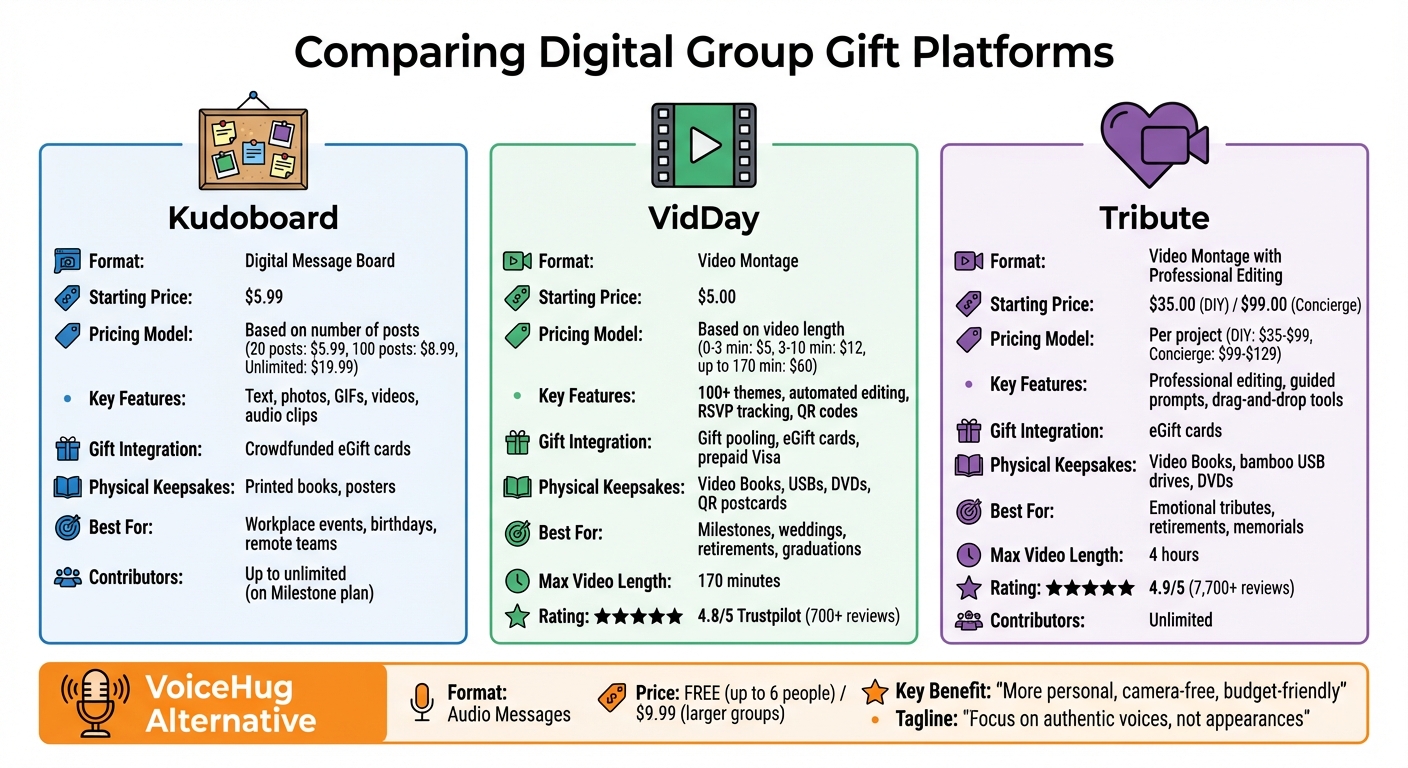
Kudoboard, VidDay, and Tribute each bring something distinct to the world of group gifting. Kudoboard acts as a digital message board where participants can share text, photos, GIFs, videos, and even audio clips, creating a collaborative wall of messages. VidDay, on the other hand, specializes in video montages, automatically combining photos and video clips into a sleek, finished product. Meanwhile, Tribute focuses on heartfelt video tributes, offering guided prompts for contributors and even professional editing through its Concierge service.
Their pricing structures reflect these unique formats. Kudoboard charges based on the number of posts, with options like $6.99 for up to 20 posts, $9.99 for up to 100 posts, and $19.99 for unlimited posts. VidDay uses a pay-per-video model, starting at $5 for videos under 3 minutes and going up to $60 for videos as long as 150 minutes. Tribute opts for a flat fee per project: $35 to $99 for DIY editing depending on length, or $99 (regularly $129) for their Concierge service.
Here’s a quick breakdown of their features, pricing, and formats:
| Feature | Kudoboard | VidDay | Tribute |
|---|---|---|---|
| Primary Format | Digital Message Board | Video Montage | Video Montage |
| Starting Price | $6.99 | $5.00 | $35.00 |
| Pricing Basis | Number of posts | Video length | Per project |
| Video Editing | None (Board only) | Robust (Mobile & Desktop) | Basic (Desktop only) |
| Contributor Login | Not Required | Not Required | Not Required |
| Invitation Tools | Email, Link | Email, Link, SMS, QR, Video | Email, Link |
| Gift Integration | Crowdfunded eGift Cards | Gift Funds & eGift Cards | eGift Cards |
| Physical Keepsakes | Printed Books, Posters | Video Books, USB, DVD | Video Books, USB, DVD |
| Best Use Case | Workplace recognition, birthdays | Birthdays, retirements, weddings | High-stakes emotional gifts |
VidDay shines in its invitation options, offering flexibility with SMS, QR codes, and even video invites - features not available with Tribute. Both VidDay and Tribute provide physical keepsakes like Video Books, USBs, and DVDs, while Kudoboard focuses on printed books and posters. VidDay also leads in customer reviews, boasting a 4.9/5 Google rating from over 1,080 reviews and a 4.8/5 on Trustpilot, compared to Tribute's 4.5/5 on Trustpilot.
Another standout feature of VidDay is its eco-conscious initiative. The platform has planted over 100,000 trees worldwide as part of its "one tree for every 10 projects" program, adding a meaningful, green element to its service. Tribute, established in 2013, holds the distinction of being the oldest platform in this category, offering over a decade of experience in creating video tributes.
These details highlight how each platform caters to different needs, setting the stage to discuss why VoiceHug provides an even more heartfelt and budget-friendly alternative.
Why VoiceHug is a Better Alternative for Group Gifts
Kudoboard, VidDay, and Tribute all offer thoughtful ways to celebrate special moments. But if you're after something more personal and budget-friendly, VoiceHug might just be the perfect fit. By focusing on audio messages instead of video montages or digital boards, VoiceHug creates a direct and heartfelt connection between contributors and recipients.
Audio-First Format
Audio messages offer something unique - an emotional depth that video often struggles to match. Without the distractions of appearance, lighting, or background setup, contributors can focus entirely on sharing their genuine feelings. Research from University College London shows that listening to audio stories can increase heart rate and slightly raise body temperature (by about 0.34°F), highlighting how deeply listeners engage with audio content.
"Listening to a story, rather than watching a video, is a more active process of co-creation, and that this imaginative process in the listener's mind is detectable on the skin."
- Daniel C. Richardson et al., University College London
The human voice conveys subtle nuances - like laughter, pauses, or even a crack in tone - that text or video can easily miss. These elements ensure the focus stays on the raw, heartfelt message. As Moé Weisensee, Co-founder of VoiceHug, explains:
"When contributors aren't focused on their appearance, lighting, or how they look on camera, they share deeper stories, more vulnerable emotions, and more authentic appreciation."
Affordable Pricing
VoiceHug keeps pricing simple: it's free for groups of up to 6 participants, with a one-time fee of $9.99 for larger groups. Compare that to VidDay, where prices start at $5 for a 3-minute video and climb to $60 for longer ones. Tribute's DIY option starts at $35, with Concierge service at $99 (regularly $129). Even Kudoboard's unlimited posts option costs $19.99. With VoiceHug, there are no hidden fees based on the length of recordings, and their 30-day money-back guarantee makes it a risk-free choice.
Besides being cost-effective, VoiceHug simplifies the entire process, making it easy for everyone involved.
Simple, Hassle-Free Experience
VoiceHug is built to be user-friendly. Contributors don’t need to download an app, create an account, or deal with complicated editing tools. All they have to do is click a link and record their message directly in their browser. Built-in prompts help ease any hesitation, making it easy for even the shyest participants to contribute.
Once all the messages are recorded, VoiceHug automatically compiles them into a polished audio montage. The final gift can be downloaded or shared via a simple link, making it accessible even for those who aren’t tech-savvy. As Weisensee puts it:
"Think about the most intimate conversations you've ever had. Many of them probably happened over the phone, where you could focus entirely on connection rather than presentation. That's what VoiceHug captures."
Because it’s completely camera-free, VoiceHug encourages higher participation rates, especially from those who might feel self-conscious on video. This inclusive approach results in a richer, more meaningful group gift that stands out from other digital gifting platforms.
Conclusion
Kudoboard, VidDay, and Tribute each bring something unique to the world of digital group gifting. Kudoboard stands out with its unlimited contributor feature and built-in crowdfunding. VidDay shines with its polished video montages, helpful reminders, and an impressive 4.8/5 rating on Trustpilot from over 700 reviews. Meanwhile, Tribute focuses on creating deeply emotional video experiences, even offering professional Concierge editing services .
That said, these platforms aren't without their drawbacks. Video-based options can feel limiting for those uncomfortable being on camera, and Kudoboard’s digital format might lack the personal touch many want for big occasions. Plus, the costs can quickly add up across all three platforms.
This is where VoiceHug offers a refreshing alternative. By focusing exclusively on audio, it captures the genuine emotion of a person’s voice without the stress of being on camera. The process is simple: contributors just click a link and record directly from their browser - no apps or accounts needed.
VoiceHug’s pricing is equally straightforward: free for groups of up to six people, and only $9.99 for larger groups. Plus, it’s backed by a 30-day money-back guarantee. If you’re searching for an affordable and heartfelt way to celebrate someone special, VoiceHug makes it easy and meaningful.
FAQs
Which option is best for a big group?
Kudoboard stands out as a great option for large groups, thanks to how easily it handles collaborative contributions. It allows multiple people to add messages, photos, videos, and GIFs to a single digital board, making it perfect for celebrating milestones like birthdays or retirements. While platforms like VidDay and Tribute specialize in creating group videos, Kudoboard’s flexibility and user-friendly setup make it a better fit for managing contributions from very large groups.
Can contributors add gifts or pool money?
Yes, platforms like Kudoboard make it easy for contributors to pool money through their crowdfunded gift card feature. This tool streamlines the process of collecting funds for shared gifts, making group contributions hassle-free. While it's unclear if platforms like VidDay or Tribute offer similar features, Kudoboard's emphasis on simplifying group gifting makes it a convenient option for financial collaboration.
How do I choose between audio, video, and a message board?
When deciding on a format, think about emotional connection, cost, and the level of personalization you want. Audio formats - like VoiceHug - offer a warm, personal touch and are often budget-friendly, usually costing less than $10. Video messages, on the other hand, bring visual expressions to life but can be pricier, often ranging between $30 and $40. For group contributions, message boards like Kudoboard allow collaborative written and visual messages, though they might not feel as emotionally immediate. Your choice depends on what matters most to you: heartfelt impact, affordability, or the type of content you want to share.
Related comparisons
- Free Kudoboard alternatives: what's actually free, and what only starts free
- VidDay pricing explained: what a group video costs by length
- Thankbox alternatives: prices, collection fees and free options